Setup guide
Two minutes: add one free key, then start from a description, a photo or your own pencil sketch.
1 · ☁️ Cloudflare Workers AI free - recommended
Chat, image generation and sketch → photo at zero cost (10,000 free units a day, no card).- Create a free account at dash.cloudflare.com.
- Copy your Account ID (Workers AI page or the right side of the dashboard).
- My Profile → API Tokens → Create Token → template “Workers AI” → Create → copy the token.
- Paste both on the 🔑 AI keys page.
2 · 🔑 More models optional
- OpenRouter - Claude, GPT, Gemini and 100+ models, pay as you go: openrouter.ai/keys → Create key.
- Google AI Studio - Gemini image models for renders: aistudio.google.com/apikey.
3 · ✏️ From your hand sketch to a full building MEP & BIM Engine
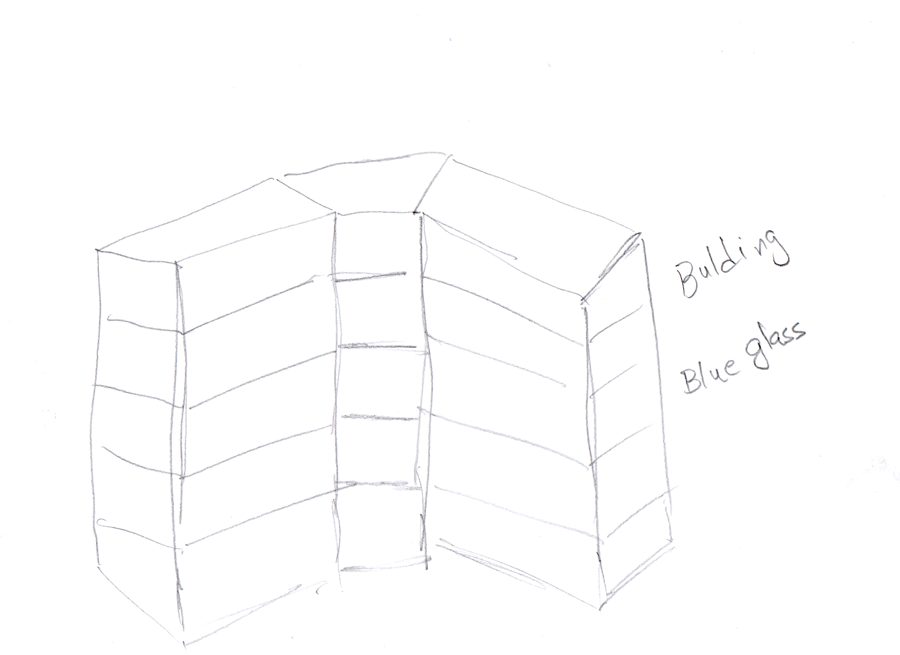
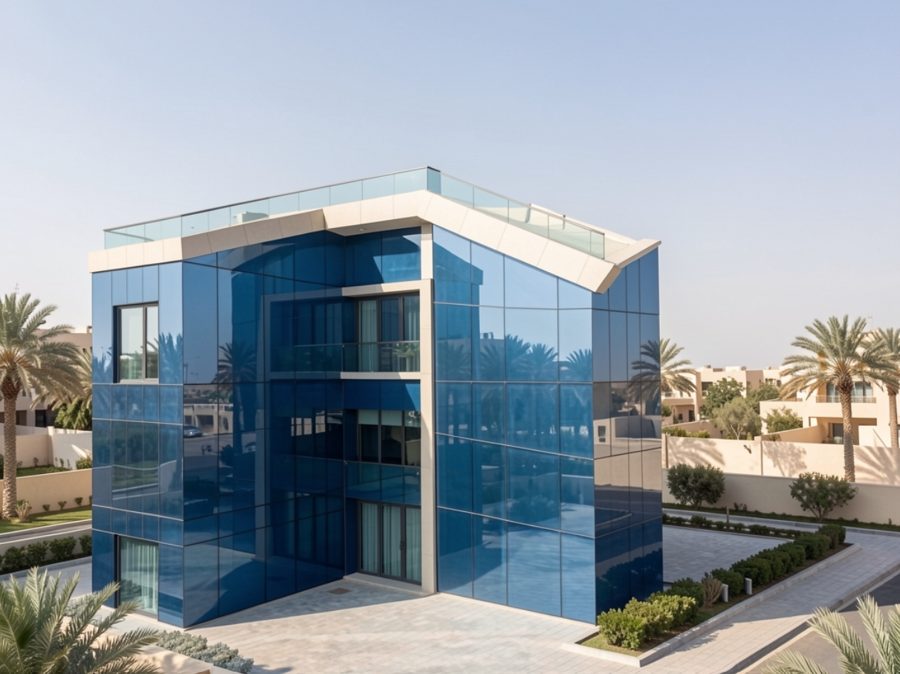
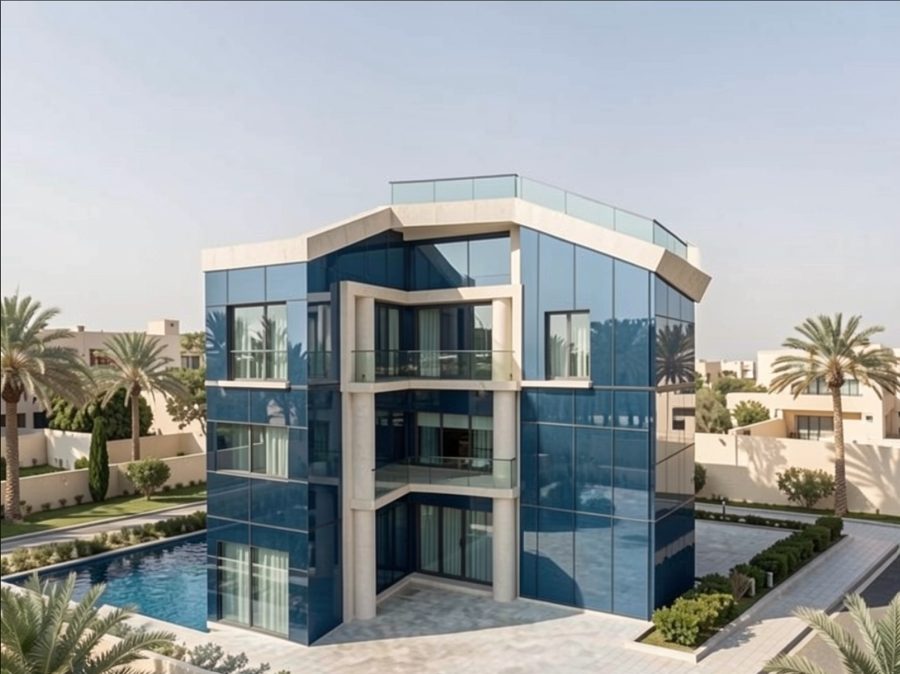
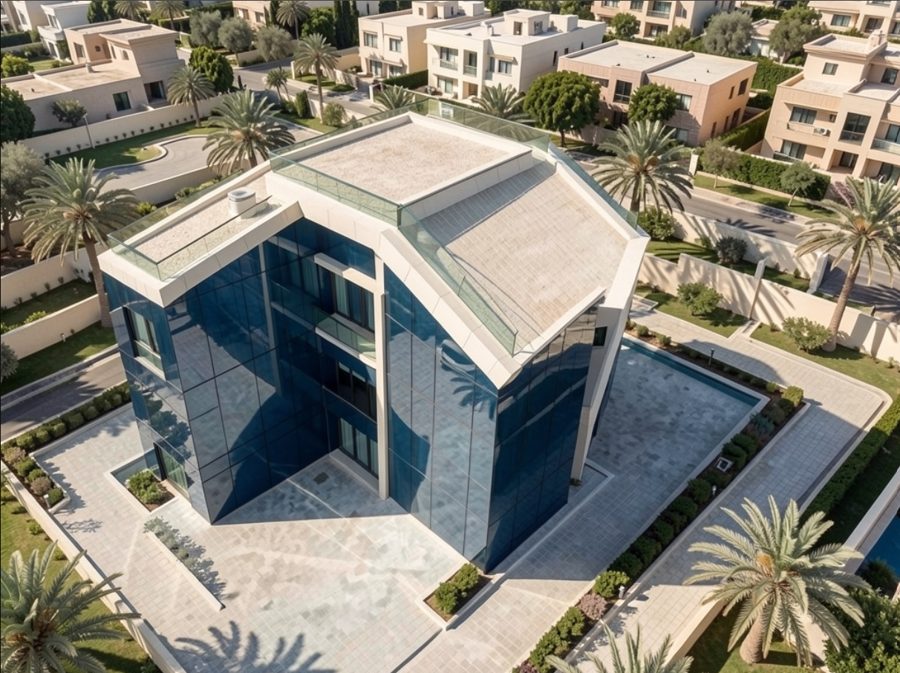
- Draw the building in pencil: every floor, window and door. Write labels - with or without arrows - e.g. blue glass, stone wall, door, WC, kitchen.
- New Project → “From my sketch → real photo” → Choose sketch → Make it real (or Pencil sketch for a cleaner drawing first) → Create image.
- Pick the best photo → ✓ Use for the project. Add a side or aerial view if you like.
- Complete project - the floors, the building shape and the facade are read from the photo → 2D plans, MEP, 3D BIM model, clash check, IFC / DXF / PDF.
- Shape not right? In 3D use ⬠ Outline (curves, angles) or 📐 Concept sketch, then ⟳ Rebuild.
💡 You can also start from a written description or an exterior photo - the steps from 3 onwards are the same.
📐 New projectMy projects🏙 Hayat Diamond Istanbul made with aidenbrain


A 102-floor mixed-use tower in Istanbul: twisted 45°, tapering to 60% at the top, wrapped in a diamond-cut blue glass facade with a pyramid crown - floors, MEP, 8 lifts and the clash check, all built in aidenbrain.
🛡 Safety & security - wind system built in Hayat Diamond Istanbul
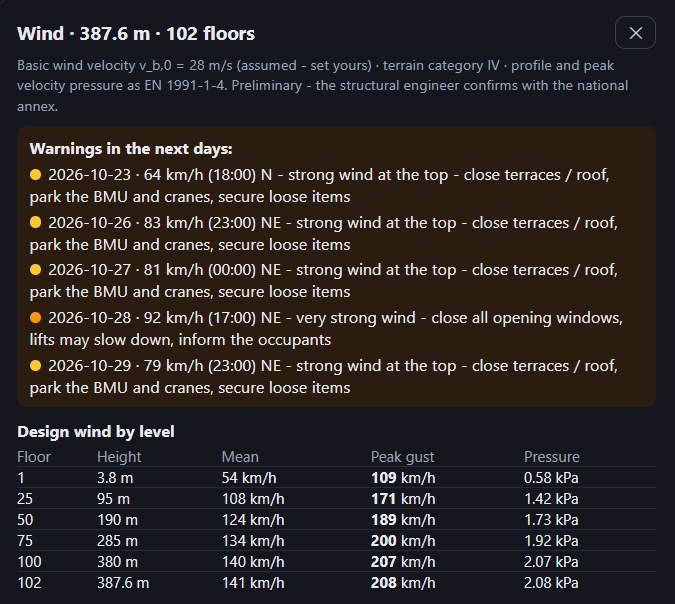
📱 Residents and hotel guests receive every warning on their mobile phones - by WhatsApp, SMS or email, days before the strong wind, in their language.
- Sensors on the building - a wind sensor (anemometer) on the roof mast and motion sensors (accelerometers) on the top floor give live readings to the building management.
- 16-day wind forecast - the forecast for the site is scaled to every level of the tower (floors 1, 25, 50, 75, 100 and the roof) and compared with the building's design wind.
- Warning levels - 🟡 amber: terraces and roof closed, facade cleaning cradle and cranes parked · 🟠 orange: all opening windows closed, lifts may run slower · 🔴 red: close to the design wind - the building management and the authorities decide on restricting use or evacuation.
- Who is told - unit owners and residents are registered with their contact details when they buy or rent a unit; hotel guests from check-in until check-out.
- How they are told - days ahead, by WhatsApp; anyone without WhatsApp gets an SMS, then an email - in Turkish, English or Arabic.
- Privacy - only people who agreed (KVKK / GDPR) are contacted; hotel guests' details are deleted the day after check-out; warnings are safety information, never advertising.
- In the building - the lifts switch to their wind mode, the facade cleaning cradle and terrace doors lock automatically from the roof sensor, and the management gets the same warnings on their phone.
The forecast is an estimate for planning - official weather warnings always come first.
3b · 🧩 BIM / MEP engine - what you get MEP & BIM
Every project becomes a coordinated 3D building model with all services - checked, clash-free and ready to install.
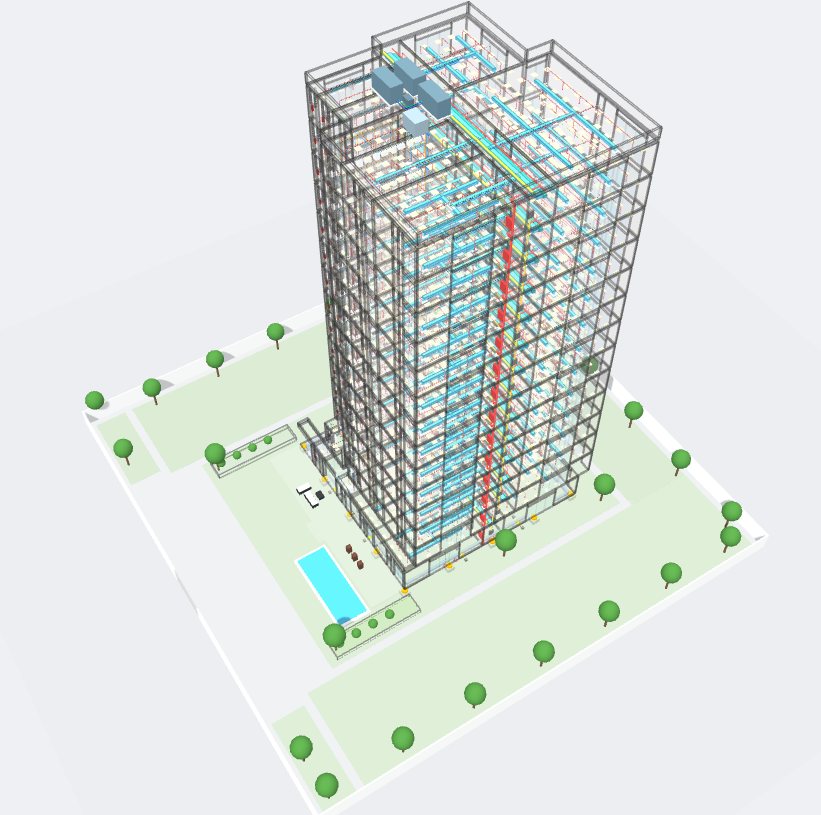
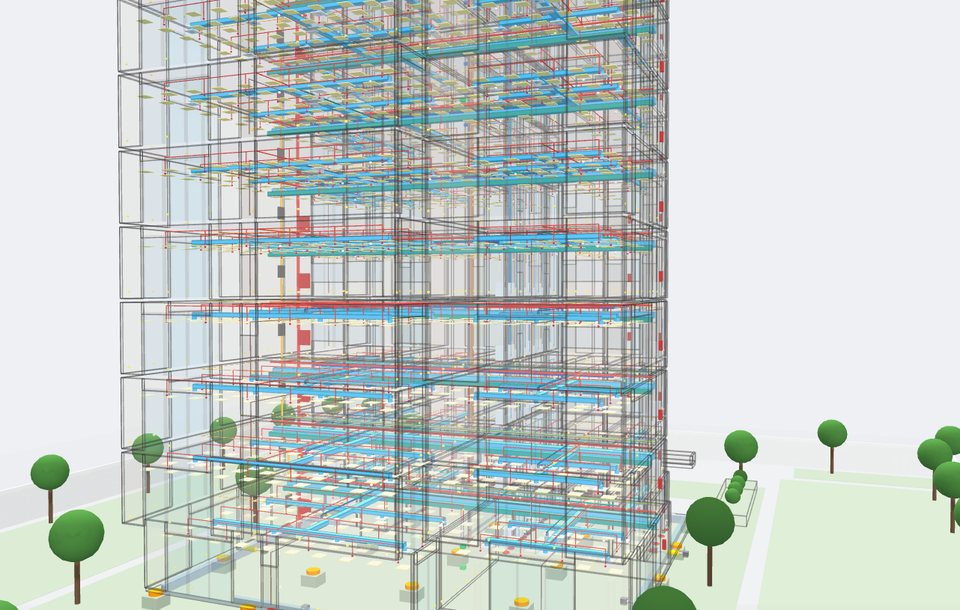
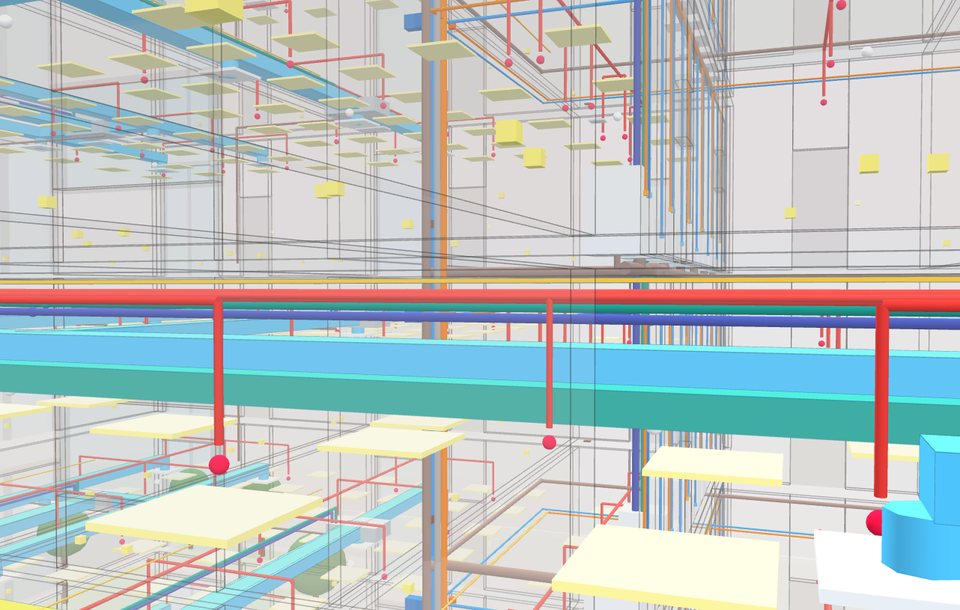
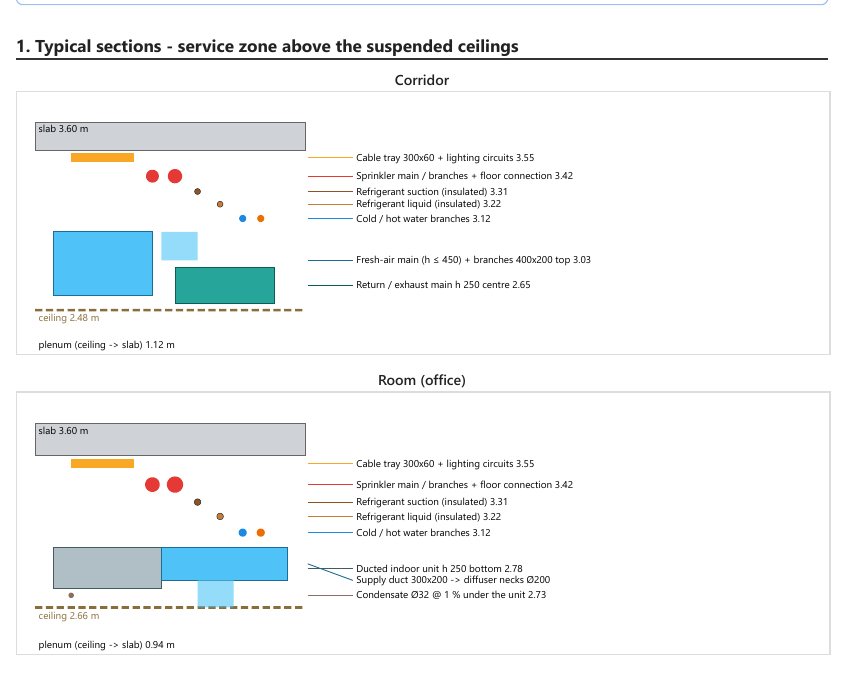
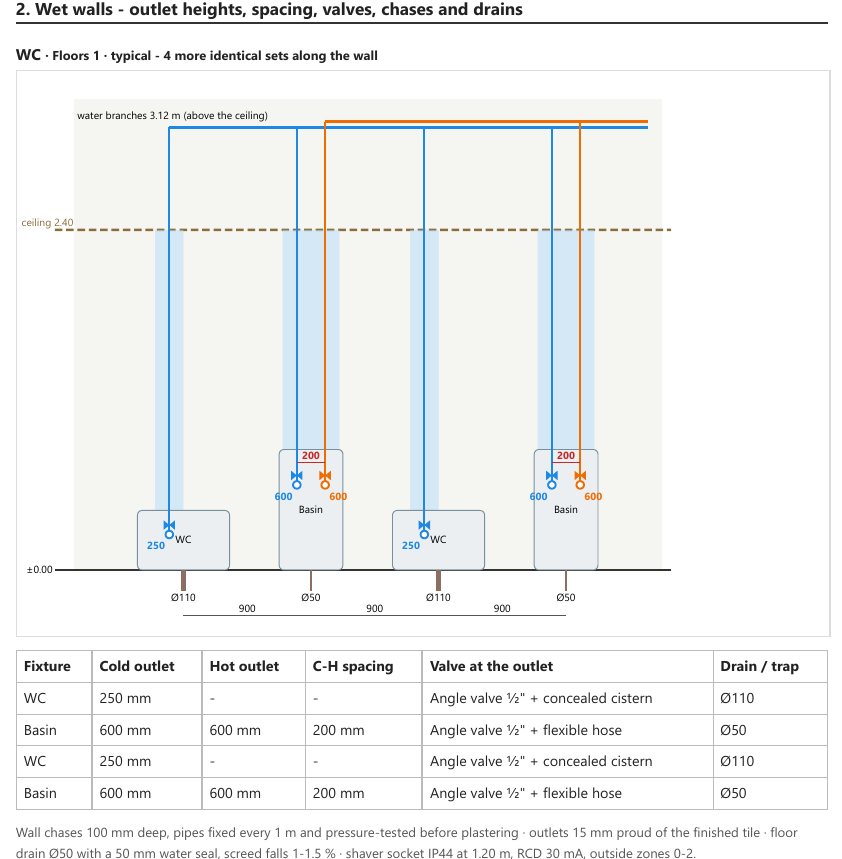
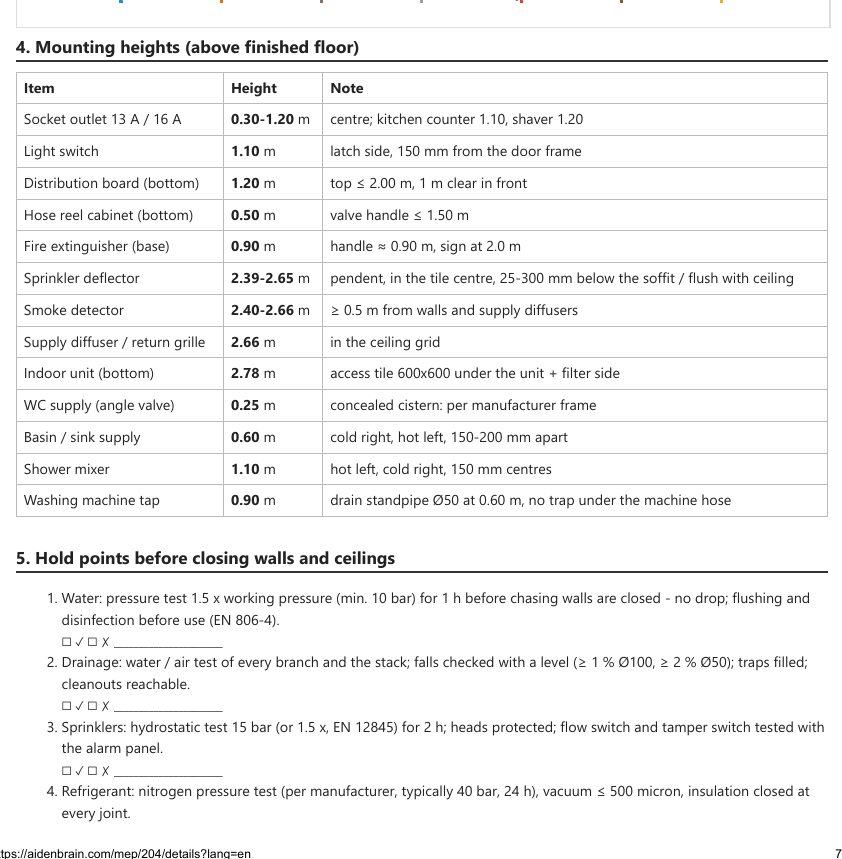
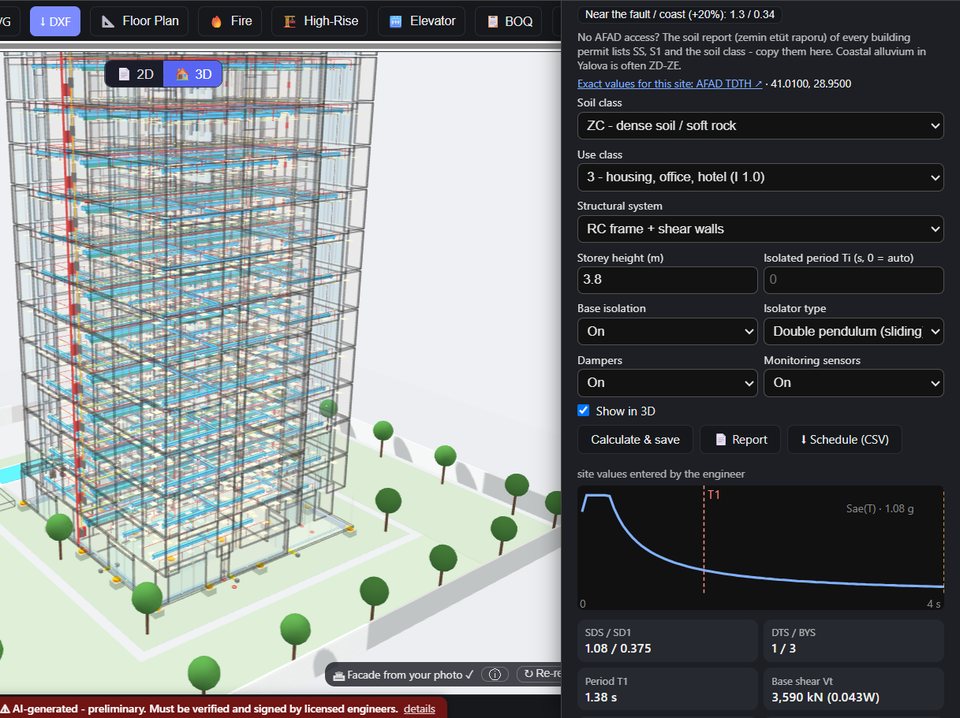


Also: 💬 edit by command (EN / TR / AR), 📥 import an existing MEP drawing (DXF / PDF / photo), engineering check, BOQ. Open any project → 3D.
Click an image to see it full size.
🏗 My projects → 3DClick an image to see it full size.
3c · 🏗 Construction set paid - per project
Make as many projects as you like - design, 3D BIM, MEP, earthquake, renders, videos and the other exports are free. When one project is ready to build, open it → ⬇ Export → 🏗 Construction set: site & setting-out coordinates, foundation, structural layout, dimensioned working plans, section, elevations, door / window / column schedules and electrical, plumbing, HVAC and fire shop drawings - one PDF + DXF set for the contractor.
1 · Request a quote (free watermarked preview available) → 2 · we check the project and send the price → 3 · click OK and pay by bank transfer with the project reference (AB-…) → 4 · the full set unlocks. The project stays editable after payment; a change of floors, area (more than 10 %), type, city or land needs an updated quote for the difference. Questions: info@aidenbrain.com
🏢 Engineering offices: ask for partner prices at info@aidenbrain.com - you get a lower trade price on every project and add your own fee when you quote your client.
4 · 🏛️ CAD Zone needs the Cloudflare key
Concept images of buildings and interiors from a description, and DXF floor plans (import / export for AutoCAD, ArchiCAD, FreeCAD).Open CAD Zone
⚠ Everything the AI produces (plans, BIM, MEP, structure, costs) is preliminary. It must be checked and signed by licensed engineers and approved by the local authority before any permit, tender or construction.
Kurulum rehberi
İki dakika: ücretsiz bir anahtar ekleyin, sonra bir açıklama, bir fotoğraf ya da kendi kara kalem çiziminizle başlayın.
1 · ☁️ Cloudflare Workers AI ücretsiz - önerilen
Sohbet, görsel üretimi ve çizim → fotoğraf ücretsiz (günde 10.000 ücretsiz birim, kart gerekmez).- dash.cloudflare.com adresinde ücretsiz hesap açın.
- Account ID değerini kopyalayın (Workers AI sayfası veya panelin sağ tarafı).
- My Profile → API Tokens → Create Token → “Workers AI” şablonu → Create → token'ı kopyalayın.
- İkisini de 🔑 Yapay zeka anahtarları sayfasına yapıştırın.
2 · 🔑 Daha fazla model isteğe bağlı
- OpenRouter - Claude, GPT, Gemini ve 100+ model, kullandıkça öde: openrouter.ai/keys → Create key.
- Google AI Studio - render için Gemini görsel modelleri: aistudio.google.com/apikey.
3 · ✏️ El çiziminizden eksiksiz binaya MEP & BIM Motoru
- Binayı kara kalemle çizin: her kat, pencere ve kapı. Etiket yazın - oklu ya da oksuz - örn. mavi cam, taş duvar, kapı, WC, mutfak.
- Yeni Proje → “Çizimimden → gerçek fotoğraf” → Çizim seç → Gerçekçi yap (önce daha temiz çizim için Kara kalem) → Görsel oluştur.
- En iyi fotoğrafı seçin → ✓ Projede kullan. İsterseniz yan veya kuşbakışı görünüm ekleyin.
- Projeyi tamamla - katlar, bina şekli ve cephe fotoğraftan okunur → 2D planlar, MEP, 3D BIM modeli, çakışma kontrolü, IFC / DXF / PDF.
- Şekil doğru değil mi? 3D içinde ⬠ Dış hat (eğri, açılı) veya 📐 Konsept çizim kullanın, sonra ⟳ Yeniden oluştur.
💡 Yazılı bir açıklama veya dış cephe fotoğrafıyla da başlayabilirsiniz - 3. adımdan sonrası aynıdır.
📐 Yeni projeProjelerim🏙 Hayat Diamond Istanbul aidenbrain ile yapıldı
İstanbul'da 102 katlı karma kullanımlı kule: 45° burgulu, tepeye doğru %60'a daralan, elmas kesimli mavi cam cephe ve piramit tepe - katlar, MEP, 8 asansör ve çakışma kontrolü aidenbrain'de oluşturuldu.
🛡 Güvenlik - yerleşik rüzgâr sistemi Hayat Diamond Istanbul
📱 Sakinler ve otel misafirleri her uyarıyı cep telefonlarında alır - kuvvetli rüzgârdan günler önce, kendi dillerinde WhatsApp, SMS veya e-posta ile.
- Binadaki sensörler - çatı direğinde rüzgâr sensörü (anemometre) ve en üst katta hareket sensörleri (ivmeölçer) bina yönetimine canlı veri verir.
- 16 günlük rüzgâr tahmini - arsanın tahmini kulenin her seviyesine (1, 25, 50, 75, 100. katlar ve çatı) ölçeklenir ve binanın tasarım rüzgârıyla karşılaştırılır.
- Uyarı seviyeleri - 🟡 sarı: teras ve çatı kapalı, cephe temizleme sepeti ve vinçler park · 🟠 turuncu: tüm açılır pencereler kapalı, asansörler yavaş çalışabilir · 🔴 kırmızı: tasarım rüzgârına yakın - kullanım kısıtlaması veya tahliyeye bina yönetimi ve yetkililer karar verir.
- Kimler bilgilendirilir - daire sahipleri ve sakinler daireyi satın alırken veya kiralarken iletişim bilgileriyle kaydedilir; otel misafirleri girişten çıkışa kadar.
- Nasıl bilgilendirilir - günler öncesinden WhatsApp ile; WhatsApp'ı olmayanlara SMS, sonra e-posta - Türkçe, İngilizce veya Arapça.
- Gizlilik - yalnız onay veren kişilere ulaşılır (KVKK); otel misafirlerinin bilgileri çıkıştan bir gün sonra silinir; uyarılar güvenlik bilgisidir, asla reklam değildir.
- Binada - asansörler rüzgâr moduna geçer, cephe temizleme sepeti ve teras kapıları çatı sensörüyle otomatik kilitlenir, yönetim aynı uyarıları telefonunda alır.
Tahmin planlama içindir - resmî meteoroloji uyarıları her zaman önceliklidir.
3b · 🧩 BIM / MEP motoru - neler elde edersiniz MEP & BIM
Her proje, tüm tesisatıyla koordineli bir 3D bina modeline dönüşür - kontrol edilmiş, çakışmasız ve montaja hazır.
Ayrıca: 💬 komutla düzenleme (EN / TR / AR), 📥 mevcut tesisat çizimini içe aktarma (DXF / PDF / fotoğraf), mühendislik kontrolü, metraj. Bir proje açın → 3D.
Büyük görmek için görsele tıklayın.
🏗 Projelerim → 3DBüyük görmek için görsele tıklayın.
3c · 🏗 Uygulama projesi seti ücretli - proje başına
İstediğiniz kadar proje oluşturun - tasarım, 3D BIM, tesisat, deprem, görseller, videolar ve diğer dışa aktarımlar ücretsizdir. Bir proje inşaata hazır olduğunda açın → ⬇ Dışa aktar → 🏗 Uygulama projesi: vaziyet ve aplikasyon koordinatları, temel, kalıp planı, ölçülü uygulama planları, kesit, görünüşler, kapı / pencere / kolon listeleri ve elektrik, sıhhi tesisat, HVAC ve yangın uygulama çizimleri - müteahhit için tek PDF + DXF seti.
1 · Teklif isteyin (ücretsiz filigranlı ön izleme var) → 2 · projeyi inceleyip fiyatı gönderiyoruz → 3 · Tamam'a tıklayın ve proje referansıyla (AB-…) havale/EFT yapın → 4 · tam set açılır. Ödemeden sonra proje düzenlenebilir; kat sayısı, alan (%10'dan fazla), tür, şehir veya arsa değişirse fark için güncel teklif gerekir. Sorular: info@aidenbrain.com
🏢 Mühendislik büroları: iş ortağı fiyatları için info@aidenbrain.com adresine yazın - her projede daha düşük bir fiyat alır, müşterinize teklif verirken kendi ücretinizi eklersiniz.
4 · 🏛️ CAD Bölgesi Cloudflare anahtarı gerekir
Açıklamadan bina ve iç mekân konsept görselleri ve DXF kat planları (AutoCAD, ArchiCAD, FreeCAD için içe / dışa aktarma).CAD Bölgesini aç
⚠ Yapay zekanın ürettiği her şey (planlar, BIM, MEP, taşıyıcı sistem, maliyetler) ön çalışmadır. Ruhsat, ihale veya inşaattan önce yetkili mühendislerce kontrol edilip imzalanmalı ve yerel idarece onaylanmalıdır.
دليل الإعداد
دقيقتان: أضف مفتاحًا مجانيًا واحدًا، ثم ابدأ من وصف أو صورة أو رسمك اليدوي بالقلم.
١ · ☁️ Cloudflare Workers AI مجاني - موصى به
المحادثة وتوليد الصور وتحويل الرسم إلى صورة بدون تكلفة (10,000 وحدة مجانية يوميًا، بدون بطاقة).- أنشئ حسابًا مجانيًا على dash.cloudflare.com.
- انسخ Account ID (صفحة Workers AI أو يمين لوحة التحكم).
- My Profile ← API Tokens ← Create Token ← قالب “Workers AI” ← Create ← انسخ الرمز.
- الصق الاثنين في صفحة 🔑 مفاتيح الذكاء الاصطناعي.
٢ · 🔑 نماذج إضافية اختياري
- OpenRouter - Claude وGPT وGemini وأكثر من 100 نموذج، الدفع حسب الاستخدام: openrouter.ai/keys ← Create key.
- Google AI Studio - نماذج Gemini للصور والإظهار: aistudio.google.com/apikey.
٣ · ✏️ من رسمك اليدوي إلى مبنى كامل محرك MEP و BIM
- ارسم المبنى بالقلم: كل طابق ونافذة وباب. اكتب ملاحظات - مع أسهم أو بدونها - مثل زجاج أزرق، جدار حجري، باب، WC، مطبخ.
- مشروع جديد ← “من رسمي ← صورة واقعية” ← اختر الرسم ← اجعله واقعيًا (أو رسم بالقلم لرسم أنظف أولًا) ← أنشئ الصورة.
- اختر أفضل صورة ← ✓ استخدمها للمشروع. أضف منظرًا جانبيًا أو جويًا إن رغبت.
- أكمل المشروع - تُقرأ الطوابق وشكل المبنى والواجهة من الصورة ← مخططات 2D، التمديدات MEP، نموذج BIM ثلاثي الأبعاد، فحص التعارضات، IFC / DXF / PDF.
- الشكل غير صحيح؟ في 3D استخدم ⬠ المحيط (منحنيات وزوايا) أو 📐 الرسم المفاهيمي ثم ⟳ إعادة البناء.
💡 يمكنك أيضًا البدء من وصف مكتوب أو صورة خارجية - الخطوات من 3 وما بعدها نفسها.
📐 مشروع جديدمشاريعي🏙 Hayat Diamond Istanbul صُنع في aidenbrain
برج متعدد الاستخدامات من 102 طابقاً في إسطنبول: ملتوٍ 45°، يضيق حتى 60% في القمة، بواجهة زجاجية زرقاء مقطوعة كالألماس وتاج هرمي - الطوابق والأنظمة الكهروميكانيكية و8 مصاعد وفحص التعارضات، كلها مبنية في aidenbrain.
🛡 السلامة والأمن - نظام رياح مدمج Hayat Diamond Istanbul
📱 يتلقى السكان ونزلاء الفندق كل تحذير على هواتفهم المحمولة - عبر واتساب أو رسالة SMS أو البريد، قبل الرياح القوية بأيام وبلغتهم.
- حساسات على المبنى - حساس رياح (أنيمومتر) على صاري السطح وحساسات حركة (مقاييس تسارع) في الطابق الأخير تعطي قراءات مباشرة لإدارة المبنى.
- توقعات رياح لـ16 يومًا - تُقاس توقعات الموقع على كل مستوى من البرج (الطوابق 1 و25 و50 و75 و100 والسطح) وتُقارن برياح التصميم للمبنى.
- مستويات التحذير - 🟡 أصفر: إغلاق التراسات والسطح وركن وحدة تنظيف الواجهة والرافعات · 🟠 برتقالي: إغلاق كل النوافذ القابلة للفتح وقد تعمل المصاعد ببطء · 🔴 أحمر: قريب من رياح التصميم - تقرر إدارة المبنى والسلطات تقييد الاستخدام أو الإخلاء.
- من يُبلَّغ - يُسجَّل ملاك الوحدات والسكان ببيانات التواصل عند الشراء أو الإيجار؛ ونزلاء الفندق من الوصول حتى المغادرة.
- كيف يُبلَّغون - قبل أيام عبر واتساب؛ ومن لا يملك واتساب يتلقى رسالة SMS ثم بريدًا إلكترونيًا - بالتركية أو الإنجليزية أو العربية.
- الخصوصية - يُتواصل فقط مع من وافق (KVKK / GDPR)؛ وتُحذف بيانات النزلاء بعد يوم من المغادرة؛ التحذيرات معلومات سلامة وليست إعلانات أبدًا.
- داخل المبنى - تنتقل المصاعد إلى وضع الرياح، وتُقفل وحدة تنظيف الواجهة وأبواب التراسات تلقائيًا من حساس السطح، وتتلقى الإدارة التحذيرات نفسها على هواتفها.
التوقعات تقدير للتخطيط - تحذيرات الأرصاد الرسمية تأتي أولًا دائمًا.
٣ب · 🧩 محرك BIM / MEP - ماذا تحصل عليه MEP و BIM
يتحول كل مشروع إلى نموذج مبنى ثلاثي الأبعاد منسَّق بكل التمديدات - مُراجَع وخالٍ من التعارضات وجاهز للتركيب.
وأيضًا: 💬 التعديل بالأوامر (EN / TR / AR)، 📥 استيراد مخطط تمديدات قائم (DXF / PDF / صورة)، الفحص الهندسي، جدول الكميات. افتح أي مشروع ← 3D.
اضغط على الصورة لعرضها بالحجم الكامل.
🏗 مشاريعي ← 3Dاضغط على الصورة لعرضها بالحجم الكامل.
٣ج · 🏗 مجموعة المخططات التنفيذية مدفوعة - لكل مشروع
أنشئ ما تشاء من المشاريع - التصميم ونموذج BIM ثلاثي الأبعاد والتمديدات والزلازل والصور والفيديو وباقي التصديرات مجانية. عندما يصبح أحد المشاريع جاهزًا للتنفيذ افتحه ← ⬇ تصدير ← 🏗 المخططات التنفيذية: إحداثيات الموقع والتوقيع، الأساسات، المخطط الإنشائي، المساقط التنفيذية بالأبعاد، القطاع، الواجهات، جداول الأبواب والنوافذ والأعمدة ومخططات الكهرباء والسباكة والتكييف والحريق - مجموعة PDF + DXF واحدة للمقاول.
١ · اطلب عرض سعر (معاينة مجانية بعلامة مائية متاحة) ← ٢ · نراجع المشروع ونرسل السعر ← ٣ · اضغط موافق وادفع بتحويل بنكي مع مرجع المشروع (AB-…) ← ٤ · تُفتح المجموعة الكاملة. يبقى المشروع قابلًا للتعديل بعد الدفع؛ تغيير عدد الطوابق أو المساحة (أكثر من 10٪) أو النوع أو المدينة أو الأرض يحتاج عرض سعر محدّثًا للفرق. للاستفسار: info@aidenbrain.com
🏢 المكاتب الهندسية: اطلبوا أسعار الشركاء عبر info@aidenbrain.com - تحصلون على سعر أقل لكل مشروع وتضيفون أتعابكم عند تقديم العرض لعملائكم.
٤ · 🏛️ منطقة CAD تحتاج مفتاح Cloudflare
صور مفاهيمية للمباني والتصميم الداخلي من وصف، ومخططات طوابق DXF (استيراد وتصدير لـ AutoCAD وArchiCAD وFreeCAD).افتح منطقة CAD
⚠ كل ما ينتجه الذكاء الاصطناعي (المخططات، BIM، التمديدات، الإنشائي، التكاليف) أولي. يجب أن يراجعه ويوقّعه مهندسون مرخّصون وتعتمده الجهة المختصة قبل أي ترخيص أو مناقصة أو تنفيذ.